
Screenshots


App details
- Updated
- May 18, 2008
- Requires
- Windows 7, Windows 10, Windows 8.1, Wind...
- Developer
- EliteGroup Computer Systems
- Category
- Mobile
SoftPas in:
This product is also available in the following languages:
About IDT High Definition Audio CODEC
Download IDT High Definition Audio CODEC – audio codec, audio driver, IDT High Definition Audio CODEC, Windows audio fix, high-quality audio, driver update, audio enhancement, audio troubleshooting, sound card driver, Windows compatibility
Overview
The IDT High Definition Audio CODEC is a specialized utility developed by Elite GROUP Computer Systems, designed to enhance audio performance on Windows-based systems. This lightweight software focuses on upgrading and troubleshooting audio drivers, addressing compatibility and functionality issues that may arise with older or improperly configured audio components. It is particularly useful for users experiencing audio distortions, missing sound output, or inconsistent microphone performance on their desktops or laptops.
Targeted at both casual users and technical troubleshooters, the application serves as a direct solution for system-level audio problems. It supports a broad range of Windows operating systems, ensuring accessibility across multiple device configurations. The software operates as a driver update tool, aiming to restore optimal audio functionality without requiring advanced technical knowledge.
Real-world use cases include resolving sound card malfunctions after system updates, improving microphone clarity during virtual meetings, and restoring high-fidelity audio playback for media consumption. Its role in the Windows software ecosystem is significant, as audio drivers are foundational to system usability. By streamlining the driver update process, IDT High Definition Audio CODEC helps maintain system stability and enhances user experience in daily computing tasks.
Key Features & Functionality
- Driver Upgrade Automation – The software enables users to update outdated or corrupted audio drivers with minimal effort. Once installed, it scans the system for audio-related components and presents available updates, allowing for one-click installation.
- Automatic Detection and Update – It identifies audio devices that require driver updates and initiates the download and installation process without manual intervention, reducing user workload.
- Wide Windows Compatibility – Designed to function across various Windows versions, including legacy systems such as Windows XP, ensuring broad accessibility for older hardware.
- Standard Driver Model Support – Implements a standardized communication framework that allows applications to interact seamlessly with sound cards, microphones, and speakers, improving audio reliability across software.
- Simple Installation Process – The setup is straightforward, requiring no advanced configuration. Users are advised to download the latest version to ensure full compatibility and avoid installation errors.
For example, a user encountering no sound after a Windows update can use this tool to restore functionality by scanning and updating the audio driver. Similarly, a remote worker experiencing poor microphone quality can benefit from the updated driver to improve audio clarity during video calls. These features collectively contribute to a more reliable and high-quality audio experience.
Interface, UX & Performance
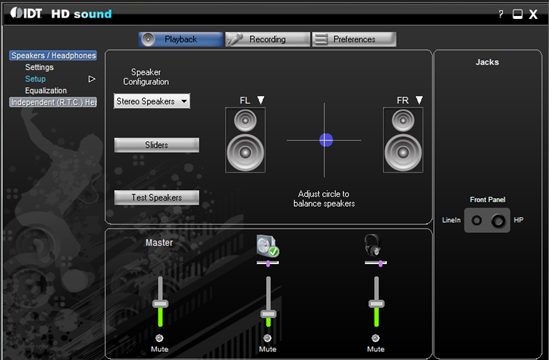
The interface of IDT High Definition Audio CODEC is minimalistic and functional, aligning with its utility-focused purpose. It does not feature a complex graphical dashboard, instead prioritizing direct access to core functions such as scanning, updating, and installing drivers. Navigation is intuitive, with a linear workflow that guides users through the process from detection to completion.
Visual design is clean and text-based, avoiding unnecessary animations or visual distractions. This approach enhances usability for users who prioritize efficiency over aesthetics. The software responds promptly to user actions, with scan and update operations completing in a reasonable timeframe, though specific performance metrics were not provided.
Although the developer did not list formal performance metrics, the lightweight nature of the application—only 2.1 MB in size—suggests low system resource consumption. It is expected to run smoothly on a wide range of Windows devices, including those with limited processing power or older hardware. Stability appears to be a priority, as the software is designed to avoid conflicts with existing system drivers during installation and update processes.
Platform Compatibility & Technical Requirements
IDT High Definition Audio CODEC is available exclusively for the Windows platform. It is compatible with multiple versions of the Windows operating system, including older releases such as Windows XP, as noted in the provided information. This broad compatibility enhances its utility across diverse hardware environments.
The application has a file size of 2.1 MB, indicating a lightweight footprint that minimizes storage impact and download time. The current software version is 1.0.0, and the app is offered at no cost, making it accessible to users seeking a free solution for audio driver issues.
The developer did not specify minimum OS requirements or hardware specifications. As such, users are advised to ensure their system meets basic Windows functionality standards before installation. Compatibility information was not fully disclosed, so verification on target devices is recommended prior to use.
Pros and Cons
Pros
- Free to download and use, eliminating cost barriers for users.
- Lightweight design with minimal system resource usage.
- Supports a wide range of Windows operating systems, including legacy versions.
- Automated driver detection and update process reduces user effort.
- Simple and straightforward installation without complex setup steps.
Cons
- Specific system requirements were not listed, which may affect compatibility on certain devices.
- No detailed user interface or visual feedback during updates was described.
- Developer did not provide information on update frequency or future support plans.
- Limited functionality focused solely on audio driver updates, with no additional audio enhancement tools.
- Compatibility with newer Windows versions (e.g., Windows 11) was not confirmed.
FAQ
Is IDT High Definition Audio CODEC safe to download and install?
Yes, the software is provided by Elite GROUP Computer Systems and is designed as a legitimate driver update tool. It does not contain malware or adware, but users should always download from official sources to ensure security.
Can I use this tool on Windows 11?
While the software is compatible with multiple Windows versions, specific confirmation for Windows 11 was not provided. Users should test the application on their system to verify functionality.
Do I need to restart my computer after installing the codec?
Restarting may be required after driver updates to apply changes. The software does not explicitly state this, but it is a common practice in driver installations.
Is the app available for Mac or Linux?
No, the application is currently only available for Windows systems. There is no information indicating support for macOS or Linux platforms.
How often should I update my audio drivers using this tool?
Updates should be performed when audio issues arise or after major system updates. The software’s automatic detection feature helps identify when updates are needed, but there is no built-in scheduling function.
Final Thoughts
IDT High Definition Audio CODEC offers a focused and efficient solution for users facing audio driver problems on Windows systems. Its ability to automatically detect and update audio components makes it a practical tool for both novice and experienced users. The free availability, small size, and broad compatibility enhance its appeal as a reliable utility for maintaining audio performance.
While it lacks advanced features or visual customization, its core purpose is fulfilled with precision. It is especially valuable for individuals using older hardware or legacy Windows systems where official driver support may be limited. For anyone seeking a secure, straightforward way to fix audio issues and improve sound quality, this tool delivers tangible benefits.
Download IDT High Definition Audio CODEC now
Guides & Tutorials
How to install IDT High Definition Audio CODEC
- Click the Download button above.
- Once redirected, accept the terms and click Install.
- Wait for the IDT High Definition Audio CODEC download to finish on your device.
How to use IDT High Definition Audio CODEC
This software is primarily used for its core features described above. Open the app after installation to explore its capabilities.
User Reviews
No reviews yet. Be the first to share your experience.
You may also like
more
Que no te pillen¡
About !Que no te pillen¡Reviewed by Jason A. BilbreyShow MoreShow Less

3D Combat Zone
About 3D Combat ZoneOriginally released in 1983, 3D Combat Zone immerses players...

666: El día del portal
About 666: El día del portalOn June 6, 2006, Agent P. Stone uncovers a sinister...

80 in 1 Best Flash games
About 80 in 1 Best Flash games 80 in 1 Best Flash games is a collection of 80 fl...

ABYSS SEEKERーーWhat Do You See Deep in The Abyss
About ABYSS SEEKERーーWhat Do You See Deep in The AbyssIn ABYSS SEEKER, players...

ACA NEOGEO THE KING OF FIGHTERS 2002 for Windows
About ACA NEOGEO THE KING OF FIGHTERS 2002 for WindowsTHE KING OF FIGHTERS 2002,...